SB Connect FAQs
Here are some questions and answers to help you navigate the City of Santa Barbara's SB Connect application.
SB Connect is the City of Santa Barbara’s official customer service platform. It allows residents to report issues, request services, and connect with City departments quickly and conveniently - either by creating an account or submitting anonymously.
Yes, you can submit a request without creating an account. However, anonymous submissions:
- Cannot receive status updates or follow-up questions.
- Are monitored more closely for misuse.
- May be limited or disabled if abused.
To get the best experience, we recommend creating a free SB Connect account.
No. Although SB Connect is a great tool for most requests, it isn't intended for reporting emergency issues that need to be addressed immediately. If the issue you are reporting is a public safety emergency, please call 9-1-1. If the issue you are reporting is a water or sewer emergency, please call (805) 564-5413.
When you login to SB Connect and submit a request without checking the box next to “Private”, basic information about the request is available to the public and will likely be indexed by internet search engines, such as Google.
In this case, there are three pieces of information displayed.
- Uploaded images,
- The address or approximate address of the request, and
- The “Description” field of the initial request.
Current SB Connect settings make all subsequent communications between the requester and staff private and not available to the public. The only other information that is shared on the public website is when the “Status” of the request is changed by City staff, for example to “In Process” or “Closed”.
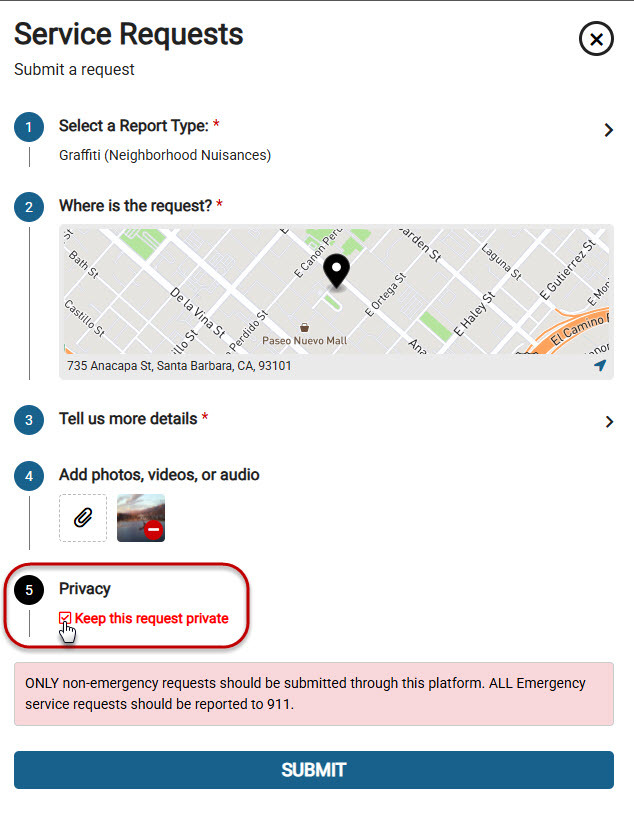
If you wish your request to not be visible on the internet, select “Keep this request private” before you submit your request.
If you decide later that you would like your request to be removed from internet visibility, you may communicate via the request that you would like it marked “Private”. City staff will mark it, removing the request and all communications from the internet. You will still be able to see communications with City staff when you login to SB Connect.
If you create a request anonymously, you will not be able to communicate through SB Connect directly with City staff.
We want SB Connect to be a respectful and effective space for everyone. Abuse includes:
| Type of Abuse | Examples |
|---|---|
| Spam or Repetition | Submitting the same request multiple times without new information. |
| Inappropriate Language | Using profanity, threats, or discriminatory remarks. |
| False Reports | Submitting fake issues or impersonating others. |
| Off-Topic Use | Using the platform for personal disputes or unrelated concerns. |
| Excessive Submissions | Overloading the system with non-urgent or low-priority requests. |
We take misuse seriously. Depending on the severity, actions may include:
- A warning message
- Temporary limits on submissions
- Suspension of account access
- Disabling anonymous submissions
- Referral to City legal or IT teams for further action
If anonymous submissions are repeatedly misused, for example, through spam or offensive content, the City may temporarily or permanently disable this option to protect the integrity of the platform.
If your submission violates our guidelines, you may receive a message explaining the issue and what steps to take. Continued violations may result in further restrictions.
- Submit accurate, respectful, and relevant requests.
- Avoid duplicate reports—check if an issue has already been submitted.
- Use appropriate categories for your request.
- Treat City staff and fellow community members with courtesy.
For questions about SB Connect or to report misuse, please contact:
Yes! However, many tablet devices don't have a true GPS and instead use Wi-Fi triangulation, which pulls location based on the number of mapped Wi-Fi hotspots. This setup can result in less accurate location information in certain areas. Always before submitting a report, a user must confirm the location. During this step, the user can correct inaccurate location information captured by the device hardware.
The mobile app prompts a user to provide First Name, Last Name, and Email Address. A user only must provide this information once and it is then stored within the app. Users may still submit reports anonymously by selecting this option in the Settings menu. Go to the “More” tab, select the “Settings” menu, and check the box marked “Report Anonymously”. Any information, such as personal information or location, is only used for reporting purposes.
Whenever you open and interact with the SB Connect app on your mobile device, the location information from your mobile device is used to tailor the experience to your current location. This information is NOT published or shared with others. The app saves that specific location information until the next time you do something in the app, at which time the old location information is deleted from your mobile device and replaced with your most recent location information. Your location data is only shared when you decide to proactively report an issue.
SB Connect uses the Google geocoder to find addresses. Often times, adding the road suffix (St, Rd, Ave, etc.) will work. For example, entering "625 Laguna" (without quotation marks) will not find an address, but entering "625 Laguna St" (without quotation marks) will find the address.